
An Instagram marketing strategy for web designers is a simple plan for showing off your work, sharing your expertise, and staying top of mind with potential clients until they're ready to hire you. This guide covers how to optimize your Instagram profile, what to post (from process content to case studies), how often to post, and how to turn Instagram followers into web design clients.
As a web designer, you have a head start on Instagram. Your work is visual, and potential clients can get a feel for your style long before they ever click through to your website.
The tricky part is figuring out what to actually post.
Scroll for five minutes and you'll see polished mockups, trending Reels, and perfectly planned grids from designers who seem to have endless time for content. It's easy to feel like you need to match all of that just to keep up.
You don't (and that’s what this ultimate guide to Instagram marketing strategy for web designers is going to cover).
Most of your future clients aren't comparing your grid to another designer's. They're small business owners trying to figure out whether you understand their problem, whether they like your work, and whether you'd be good to work with. A simple, consistent Instagram marketing strategy can answer all three, without turning you into a full-time content creator.
In this post, we're covering:
- Why Instagram is a good marketing channel for web designers
- How to optimize your Instagram profile (bio, link, and brand message included)
- A simple Instagram content strategy for web designers
- FAQs about Instagram marketing for web designers
Why Instagram Is a Good Marketing Channel for Web Designers
Let’s start with the obvious: web design is highly visual.
Instagram gives you plenty of ways to show what you can do, from before-and-after website transformations and portfolio projects to behind-the-scenes peeks at a design in progress.
But the visuals are only part of it.
Hiring a web designer can be a big investment, especially for a small business owner. Potential clients want to see beautiful work, sure, but they also want to understand your process, hear your opinions, and get a sense of what working with you might actually be like.
Instagram gives them a place to do all of that before they ever inquire.
And because someone might follow along for weeks—or months—before they need a website, showing up regularly helps keep your business in the mix. When “I should really redo my website someday” finally becomes “Okay, this website has GOT to go,” your name is more likely to come to mind.
How to Optimize Your Instagram Profile As a Website Designer
Before worrying about what to post, you need to make sure your Instagram profile is doing its job.
Someone who lands there should quickly understand who you are, what kind of web design you do, who you work with, and where they should go next.
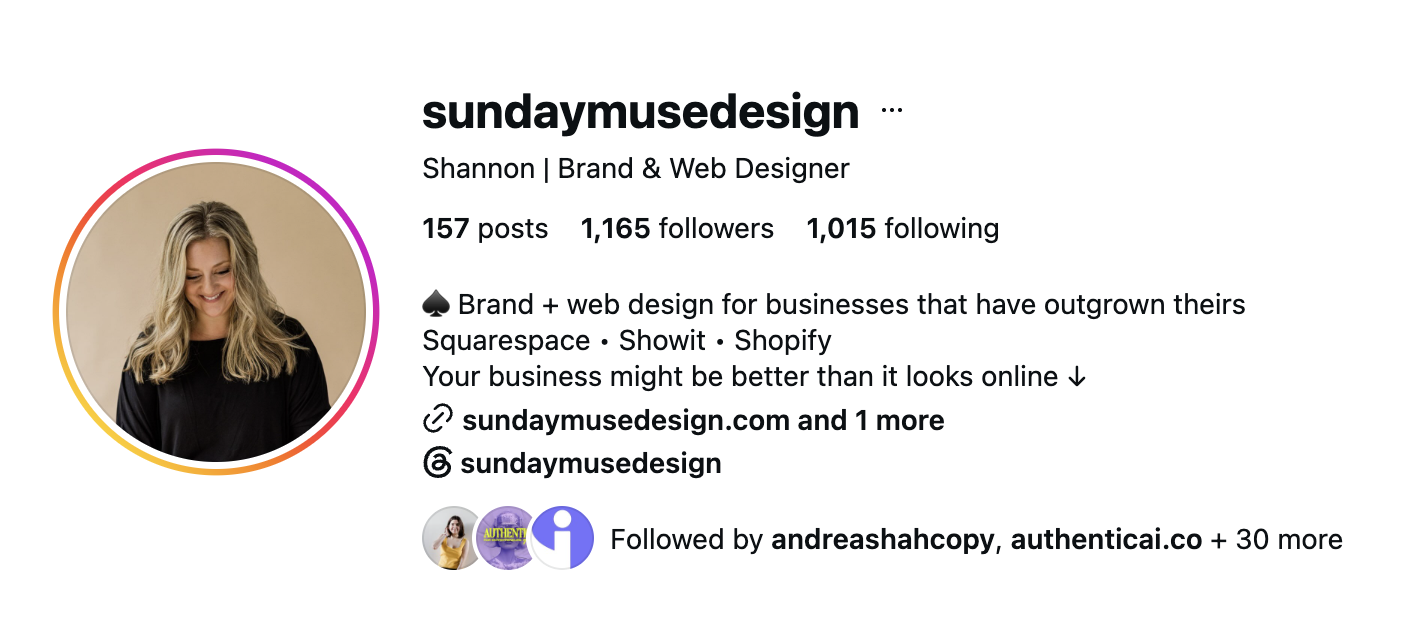
Write a clear Instagram bio
Instagram bios have limited space, so make every character count.
Start with the important stuff: what you do, who you do it for, and any detail that helps someone quickly decide whether they're in the right place.
“Web designer for business coaches” is considerably more useful than something vague like “creative making digital magic.” Relevant terms like “web designer,” “Showit designer,” “Shopify designer,” or “Squarespace designer” can also help viewers immediately recognize whether or not you’re the right website designer for them.
Use The Link Feature
Once someone is interested, give them somewhere useful to go.
Instagram lets you add multiple links to your profile, but that doesn't mean you have to use every slot. When someone sees a long list of options, they don't know which one matters, so they often don't tap any of them.
Pick the one or two places that matter most right now. For most web designers, that's your inquiry page or services page, plus maybe your portfolio or a free resource if it fits your goals.
Then make the most important next step the easiest one to spot. Someone who's ready to inquire shouldn't have to tap through four different pages and solve a small riddle to figure out how to contact you.
Keep Your Brand and Message Clear
Let's be honest: aesthetics matter more for web designers than for most other businesses.
A potential client scrolling your Instagram isn't just learning about your services. They're judging your eye for design. If your feed feels messy or disconnected from the websites you build, it's fair for them to wonder whether you'll bring that same energy to their site.
But a feed that looks good doesn't have to eat up hours of your week.
The trick is making a few design decisions once, then reusing them:
- Create a handful of templates for the posts you share most often, like portfolio features, tips, and client testimonials.
- Stick to a small set of brand colors and fonts so everything feels like it belongs together without you having to think about it.
- Keep your project mockups and photos consistent, using the same style of device mockups, backgrounds, or editing each time (even though each project might look very different).
The same goes for your message. Talk regularly about the ideas you want potential clients to associate with you, whether that's your niche, your process, or the kinds of problems you love solving. When your visuals and your message line up, it's much easier for someone to understand what you do and remember you later.
A Simple Instagram Content Strategy for Web Designers
An Instagram strategy doesn't need 14 content pillars, a complicated spreadsheet, or an elaborate posting schedule you'll abandon about nine days from now.
A few reliable content types can do plenty of heavy lifting.
Mix Up Your Post Types
Reels, carousels, and Stories each give you a slightly different way to communicate.
- Reels: Quick tips, website transformations, design walkthroughs, and behind-the-scenes content.
- Carousels: Educational content, case studies, and step-by-step explanations.
- Stories: Works in progress, client wins, quick opinions, polls, and everyday behind-the-scenes moments.
Show the process, not just the finished website
A polished website is satisfying to look at, but the finished product only tells part of the story.
Bring people into the process.
Share an early wireframe next to the final page. Explain why you moved a call to action. Talk about the navigation problem you were trying to solve. Show how a homepage changed after client feedback.
That context helps potential clients see that they're not simply hiring someone to make things pretty. There’s thought behind the work—and Instagram gives you a great place to show it.
Turn Case Studies and Social Proof Into Content
Case studies don't have to live exclusively on your website.
Take one client project and break it into several Instagram posts. One could explain the problem, another could show the before-and-after, and another could share the client's reaction or results.
Testimonials can get the same treatment.
Instead of simply dropping a quote onto a graphic, add some context. What was the client struggling with before? What did you work on together? Why did that particular result matter? Social proof becomes much more useful when people can see the story behind it.
Show Your Face and Share Your POV
People aren't only hiring the websites in your portfolio. They're hiring the person behind them.
That doesn't mean every Reel needs to feature your face or that Instagram needs a play-by-play of your personal life. But giving potential clients a sense of your personality and perspective can make it much easier to imagine working together.
Talk about a web design opinion you have. Explain something clients often misunderstand. Hop onto Stories and share what's happening with a current project.
A little human goes a long way.
Pick a Posting Cadence You Can Actually Maintain
Here's where a lot of web designers get tripped up: they start strong.The post every day, share stories, record the Broll. And it works great for about three weeks, until a big client project lands, Instagram falls to the bottom of the list, and the account goes quiet for two months.
Posting less often but consistently beats an ambitious schedule you can't keep up. Potential clients would much rather see you show up twice a week, every week, than seven times one week and then disappear.
So start with two feed posts per week and use Stories in between. If three or four feels manageable once you've found your rhythm, great. But start with what fits your schedule on a busy week, not on your most motivated Monday.
And if you want to make it easier, Enji, our marketing project management software, lets you plan your posts on a marketing calendar, write captions in your brand voice with the AI copywriter, pull in your designs from Canva, and schedule everything to Instagram from one place.
FAQs About Instagram Marketing for Web Designers
How can I use Instagram to promote my web design business?
Use Instagram to show your work, share your expertise, and help potential clients get to know you, so you're top of mind when they're ready to hire a web designer.
That means going beyond "Now booking!" posts. Show your work with context. Teach potential clients something useful about their websites. Share case studies and testimonials. Talk about your services and who they're for. Show parts of your process and let people get to know the person they'll actually be working with.
Instagram can also help you build relationships with copywriters, photographers, brand designers, marketers, and other business owners whose audiences overlap with yours.
Promotion doesn't always need to sound like "BOOK NOW." Often, it looks like consistently giving people reasons to pay attention and trust your expertise.
How can I grow my Instagram following?
Grow your Instagram following by creating content your ideal clients care about, keeping your profile clear, and actually engaging with the people and communities you want to be known in.
And remember, a huge following isn't the goal if none of those people are likely to hire you. Focus on attracting more of the right people.
A clear profile helps. So does creating content around questions and problems your ideal clients actually care about, not only content that impresses other designers.
Engagement matters, too. Reply to comments and DMs. Have actual conversations. Engage thoughtfully with businesses and people in the communities you want to be known in.
And when something resonates? Pay attention. One good post can often become another Reel, carousel, Story, or follow-up topic instead of disappearing into the feed forever.
How do I get web design clients on Instagram?
You get web design clients on Instagram by creating content for every stage of the decision: introducing yourself to new followers, building trust with interested ones, and making it easy for ready-to-hire followers to inquire.
Someone who has never heard of you needs different content than someone who's been following for six months and is seriously considering a new website.
At the top of the funnel, content helps people understand who you are and what you do. Portfolio work, helpful Reels, and educational posts can introduce your business.
As they get more interested, case studies, process content, testimonials, and your expert POV help answer the bigger question: Could this designer be right for me?
Closer to the decision, make your services and next steps clear. Talk about who your offers are for, what working together looks like, availability, and how to inquire.
Across that marketing funnel, think about what potential clients need to see, hear, and feel before hiring you.
They need to see proof that you can do the work. They need to hear how you think and what makes your approach different. And they need to feel confident that you understand what they need and would be someone they want to work with.
Should I advertise on Instagram to get website design clients?
Instagram ads can be worth testing once your profile, offer, and organic content are already working, but paying for reach won't fix unclear marketing.
Before spending money, make sure your Instagram profile clearly explains what you do, your offer makes sense, and there's an easy path from seeing the ad to learning more or inquiring.
It also helps to build some organic content first. You'll have a better sense of which messages, topics, and examples already get a response from your audience instead of paying to guess.
Ads can then become another way to get those messages in front of more people, not a magic button for instant web design clients.
Keep Your Instagram Strategy Simple
Instagram can be a great marketing channel for web designers, but it doesn't need to take over your business.
Start with a clear profile. Post at least a couple of times a week if that's realistic for you. Mix Reels, carousels, and Stories. Share finished projects and the thinking behind them. Bring in case studies and social proof. And let potential clients see enough of you to understand who they'd actually be hiring.
Most importantly, create content with the whole client journey in mind instead of treating every post like it needs to generate an inquiry on the spot.
Instagram is only one part of marketing for web designers, and it works best when it fits into a bigger plan you can actually keep up with.
That's where Enji comes in. Instead of marketing living in approximately 14 tabs, three notebooks, and the back of your brain, Enji helps you plan what marketing you're going to do, create the content, and keep showing up without making marketing another full-time job. Start your free trial of Enji and get all those marketing to-dos out of your head and into an actual plan.

Tayler Cusick Hollman
Founder of Enji | Small Business Marketing Strategist
Tayler Cusick Hollman is the co-founder of Enji, a marketing project management built specifically for small business owners who are doing it themselves. With 10+ years of experience in small business marketing, Tayler has helped thousands of founders create clear, repeatable marketing systems that drive consistency, visibility, and revenue—without relying on agencies or complicated tools.Her work focuses on creating realistic marketing plans, getting those plans done, and helping small business owners do the marketing that matters to them. Tayler’s framework and insights are used by entrepreneurs across industries to plan, do, and review their marketing with confidence.