
You're posting on Instagram. Maybe running a few ads. Maybe you went to that networking event last month because someone said it "could be good for business."
And somewhere in the back of your mind, you're wondering: is any of this actually doing anything?
Here's the direct answer: you can know exactly which marketing efforts are moving the needle (and which ones are a waste of your time) by using UTMs. A UTM is a short snippet you add to the end of a link that tells your website analytics exactly where a visitor came from.
Used right, you can see the exact post, event, or ad that brought in a lead or a sale. You can even look back at your top customers and see how they first found you, and every touchpoint they hit along the way.
The concept itself is simple. You add a snippet to your link, and you're good to go. But most people struggle to add UTMs everywhere they need to, which leaves half their data still a black hole. Or they use them inconsistently, which makes the data harder to trust than having none at all.
By the end of this post, you'll know exactly which marketing touch points need a UTM—and you'll have two reliable ways to start using them.
Here’s what you’re going to learn when you read this entire blog (about a 10 minute read):
- Why you can't tell which marketing efforts are working (...yet)
- What a UTM actually is (in plain language)
- Where you should (and shouldn't) use UTMs
- How to actually set up and use UTMs

This article is written by my friend, Ally Anderson.
Ally is a data-backed marketing strategist and the founder of Akari Digital. She helps small business owners put their time, energy, and money in the right places when it comes to their marketing. After more than a decade in digital marketing, she's watched countless business owners throw marketing spaghetti at the wall, hoping something sticks— simply because they don't know how to track their results. She shows them how to make sense of their marketing data in simple, practical ways, so they can invest in what works and stop wasting resources on what doesn't.
Why you can't tell which marketing efforts are working (...yet)
Most small business owners are not short on effort. They're creating content for a few platforms, maybe running some ads, showing up at events, sending emails. Whether they're hiring support or doing it themselves, they're investing a lot in their marketing.
So how do you know if any of it is actually working? All of it eventually points back to your website, where someone inquires or buys. Google Analytics is supposed to tell you how that happened. That's the whole point of it. So you log in to check… and most of your traffic comes through as "Direct." What the heck does that mean?
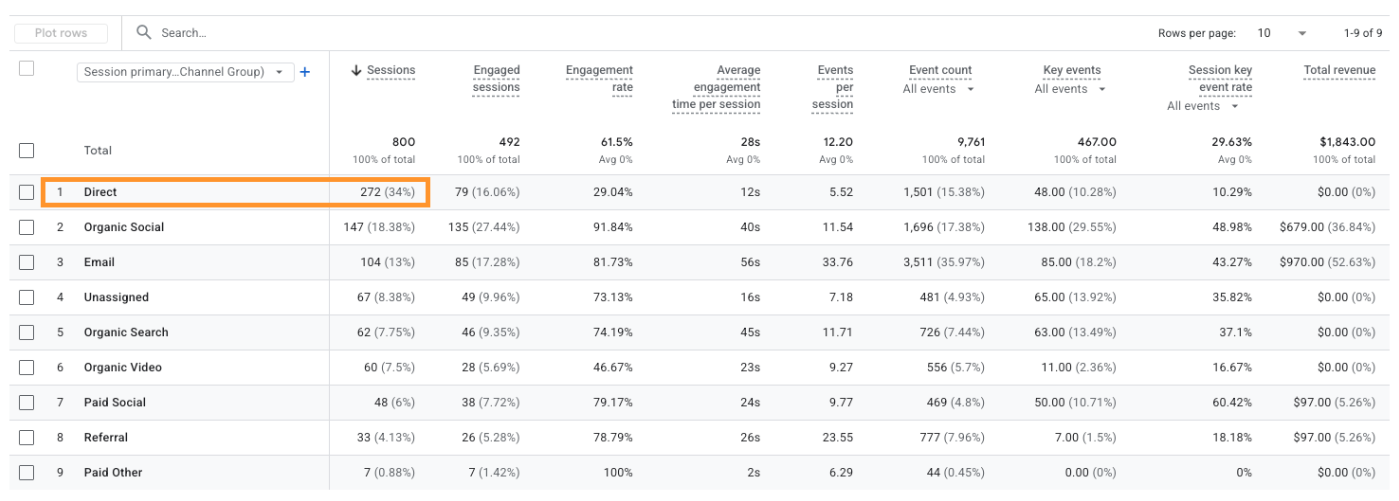
I'll tell you what it means— direct traffic is Google Analytics' way of saying "I have no idea where this person came from." Some people will tell you that it's just visitors typing your URL straight into their browser bar. And sure, sometimes that's true.
But think about how often you actually type out a website's full URL from memory. Now do you think that's supposedly happening for a huge chunk of your traffic, every single day? Unlikely, right?
Some direct traffic is completely normal. But it should not be the majority of your traffic.
Most of the time, a lot of direct traffic means visitors are coming from places Google Analytics can't identify. And you need UTMs to tag that traffic so it shows up as what it actually is.
If you're not using UTMs on these platforms, that traffic will often show up as direct (or get miscategorized somewhere else):
- Paid ads
- Speaking, summits, or collaborations
- Podcasts
- Links in PDFs, Google Docs, or other resources
If you're using any of those and you're not using UTMs, you're running off vibes. You won't know if those efforts are actually worth doing, or if they're just a waste of time.
What a UTM actually is
A UTM is a small snippet of text you add to the end of a link. It doesn't change where the link goes, it just adds tags so your website analytics knows where that traffic came from.
For example, say I want to link back to my website inside an email newsletter. I might link a button to my homepage → akaridigital.ca
If I use that link as-is, anyone who clicks it is going to show up in Google Analytics as "direct," because email traffic isn't tagged by default.
But if I add a UTM, it looks like this → akaridigital.ca?utm_source=akari-newsletter&utm_medium=email&utm_campaign=weekly-content&utm_content=aug-27_august-roundup
By adding that UTM, that traffic now gets categorized as "email" instead of "direct" — and I will be able to see exactly how many sales came from that specific email.
I know it might look complicated. But you don't write these from scratch. You use a tool to build them for you. Let me show you how.
Where you should (and shouldn't) use UTMs
The first thing to wrap your head around when you start using UTMs is figuring out where to use them, and where not to. Some people get excited and start using them everywhere, which can actually cause problems.
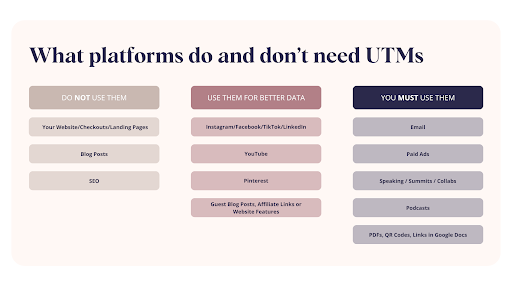
You do not want to use UTMs on your own website, blog posts, checkouts, or landing pages. Google Analytics (when it's set up correctly) already tracks how people move between pages on your site. If you add UTMs to those internal links, you'll confuse that tracking because the internal UTM overwrites the one you actually wanted to keep.
Some platforms don't need UTMs to categorize your data, but using them can still give you better detail.
And on some platforms, you must use UTMs if you want to know whether that platform is actually working.
Learn more about using UTMs to step up your marketing.
Platforms where you must use UTMs to track performance
Paid Ads (Meta Ads, Google Ads, LinkedIn Ads, etc.)
If you're spending money on ads—Meta, Google, TikTok, LinkedIn, anywhere—UTMs are non-negotiable.
If you don't use UTMs, your traffic from ads will get attributed to the organic platform. So all Meta ad traffic would show up as "Organic Social." And I certainly want to be able to differentiate between the clicks I pay for on Meta versus the ones coming from my organic content.
You want your UTMs to categorize your ad traffic as "Paid Social" or "Paid Search," and to be able to tell which specific campaigns, audiences, and ads are the ones getting clicks and driving conversions.
Email Marketing
If you don't use UTMs on the links in your emails, all that traffic will come through as "direct," which is not helpful at all. You want to add UTMs to your email links so you can see exactly which emails, sequences, or types are the ones people are clicking on.
Yes, your email marketing platform will tell you how many people clicked. But this data can be inflated because of how clicks are tracked. Some inbox tools automatically open and click links to test for spam and bots, which can inflate your click rates.
And even if we assume your click data is accurate, it can't tell you which emails were more convincing and actually drove conversions. If you know which emails drive sales, you can reuse them, repurpose them, or figure out what makes them work so you can send more like them.
Podcasts
If you don't use UTMs, your podcast traffic will likely get attributed to other categories. People will click a link in your show notes, which comes through as "direct" without a UTM— or they'll just google your business name, which comes through as “Organic Search”.
For podcasts, I recommend adding UTMs to every link in your show notes, and setting up a landing page on your site made specifically for the podcast with a unique URL you prompt people to visit for next steps. When they type that URL in, a redirect adds the right UTMs so your podcast gets tagged properly, and your listeners land exactly where you want them to.
When you do this, you'll be able to see exactly which podcast episodes drive people to your site, and how well each one converts. You can also see whether it's your guest episodes or solo episodes performing better, or which types of content are actually working.
Collaborations & PR
If you're guesting on other people's podcasts, having someone share your links in their emails, running workshops together, or creating content together— all of that data defaults to whatever channel the platform assigns it to.
If you use UTMs, you can see exactly how much traffic, leads, and sales came from each individual collab.
In-Person Events, Speaking, and Networking
This one gets missed often because it feels harder to track marketing that isn't digital. But it's not. If you hand someone a card with a QR code, you can track how many scans came from it, and what people did after.
If you're speaking at an event and have a QR code on your slides, you can tag that link and track engagement from it. That way, you can test different speaking topics or different audiences, and see what actually performs.
Links in PDFs, Google Docs, Course Portals, etc.
This is another one that often gets missed, and it can lead to a lot of "direct" traffic. If you have freebies, resources, or a course portal with links to upsells or additional products, you'll want to UTM tag those links so you can clearly see how many clicks they drive.
This matters most for resources you share in your funnels. If someone downloads your freebie (say, a PDF with a link to the offer you're selling) you want to know how many people clicked that link, and whether it's actually driving conversions.
Platforms where you don’t *need* UTMs, but it’s still recommended
Organic Social Media (Instagram, Facebook, TikTok, LinkedIn, Pinterest)
Most of your organic social traffic will automatically get tagged as "Organic Social" without UTMs, but UTMs can get you much better data.
With UTMs, you can see whether people are clicking more from stories, DM links, your link-in-bio, or Manychat automations, and whether one converts better than the others. If you have specific content themes or pillars you want to test against each other, UTMs let you see which one is actually driving more clicks and sales.
YouTube
Google Analytics will automatically categorize clicks from YouTube as "Organic Video" without UTMs, but you can get much better data if you use them.
With UTMs, you'll be able to see exactly which videos are driving clicks to your website and start to understand what types of content perform best.
Guest Blog Posts, Links in Directories or Partner Website Features
If another website links to you in a guest blog post, a directory, or a feature, you'll see those clicks as "referral" traffic from their domain, and you can check the "source" parameter to confirm exactly where it came from.
But if you have a lot of these, or if some are paid and some are free, or you want to categorize them by type or partnership model, you can use UTMs to get way more insight into this.
How to actually set up and use UTMs
First, add a step to your content creation process or SOP for each of the UTM types listed above, so it's never something you have to remember on the fly.
- If you have formal SOPs, make a note in there to add a UTM link every time.
- If you use AI agents to walk you through your process, update the prompt so it tells you to create a UTM.
Next, you need a quick and easy way to actually build the links.
The simplest tool to start with is Google's free UTM builder. You drop in your parameters, and it builds the link for you.
But if you don't know what parameters to put in each field— or you don't want to maintain a giant spreadsheet of every parameter you've ever used— check out my UTM builder, UTMs Made Simple.
You just tell it what your link is (e.g., an email link), it'll ask you a few questions (e.g., is this a newsletter or a sequence?), and it'll build your UTM link in seconds.
I've programmed it with a complete UTM tracking strategy that works across your whole business, including:
- Email marketing
- Social media
- Ads
- YouTube
- Podcasts
- Collaborations
- Speaking engagements
- Freebies and lead magnets
- QR codes and printed marketing materials
So everything works together and your data stays clean, organized, and easy to understand.
If you want to watch a video walkthrough of both options, I covered them in this short video: